
A video editor your team and coding agents work in together

TL;DR: Kino lets you make videos with your teammates and your agents. Footage storage, a full video editor and review links are bundled into one, so Codex / Claude Code work on the same timeline as your team. The editor is free at https://kino.ai.
https://www.youtube.com/watch?v=YcPB7zKRn9c
Hi YC! I'm Luke from Kino. We made the launch video above entirely in Kino, and it has passed 2.1 million views on X.
The problem
Opus 5.5 can edit videos and make great motion graphics now. But with a raw agent harness, you need to describe tiny edits either in words or in quick one-off UIs, you can't refer to footage shared across your devices, and you can't work with teammates the way you do in Google Docs or Figma.
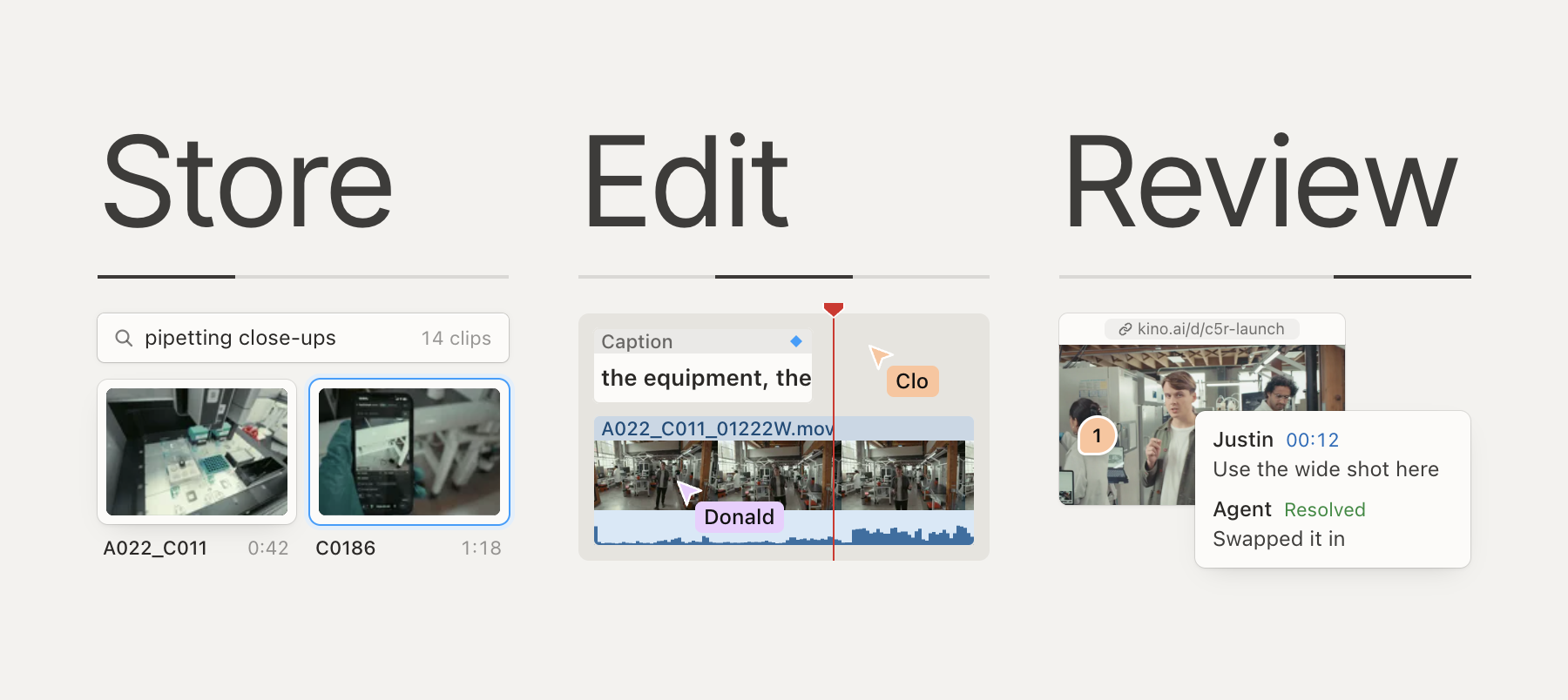
What Kino does
Kino is code-first. All editing, all motion graphics, all dragging of timeline items around and all teammate comments are expressed as code, built on Remotion. This was hard to get right, as we found ourselves building a what-you-see-is-what-you-get editor for React, which we then turned into a video editor. So you can drag and nudge anything your agent made without prompting again. It is also fully collaborative and real-time, so you can see your teammates' cursors and which part of the timeline they're watching. For our launch video I had 5+ agents editing the timeline concurrently while my friend Donald had his swarm working a few minutes further down.
Everything you import gets transcribed, embedded, described, and face-detected, so your agents can find the right footage. We built custom decoders for professional codecs such as ProRes, BRAW and R3D, which means you can drag a 250GB ProRes clip from your new iPhone right into your Kino timeline.
Everything in Kino has a URL: projects, clips, footage, comments and replies, even a single frame and the line of code that draws it. I paste Kino links into my agent constantly, whether it's making sure Codex knows exactly which timeline item I am referring to or which teammate's comment needs fixing.
You don't need footage to start. Give Kino your company URL or past work and it has something to build from, and https://kino.ai/templates has formats you can reuse. You can also ask the agent to turn a finished project into a template for next time.

How teams use it
Reducto's founders and head of growth made the launch video for their new model, r-1 mini, in one Kino project in just over a day: https://x.com/trykino/status/2118398159068246021

We have teams managing their whole company's media in Kino, spinning up agents to make new videos every day, then using review links to flag issues. One founder ships ads like this: each day he uses Kino's YouTube support to find b-roll he is allowed to use, he edits something, his co-founder leaves notes such as "we need to use this clip instead" and his agent applies them. If you have footage sitting on a phone or SD card, plug it in and Kino indexes everything and lays out a first stringout.
Where we came from
Our first YC launch in 2023 proclaimed that Kino was "Silicon Valley meets Hollywood." It was more like Palantir for Hollywood; we ran bespoke on-prem Kino deployments with our team of forward deployed engineers on shows like Survivor and A24's Beef. It was a rush, but it felt like the slowest way to improve video editing for the whole world. So in 2025, we rebuilt Kino as a true editor, and we took a bet on coding-as-editing.
Pricing
The full editor is free, including unlimited imports and exports, real-time collaboration and MCP access for your own agent. Pro is $25 per editor per month and adds unlimited MCP tool calls, share links, more storage, YouTube search, and the ability to edit alongside your team. Kino is a desktop app for now, with browser support coming soon.
Our ask
- Making a launch or Demo Day video? Send me a Drive link to your raw footage and I'll send back a Kino project link with a full library and a rough cut.
- Download Kino at https://kino.ai, point Claude Code or Codex at it, and tell us what breaks.
📸 Kino AI - Silicon Valley meets Hollywood

